Error Handling in JavaScript: Try, Catch, Finally

JavaScript runs in the browser, on servers, in apps — pretty much everywhere. And with that comes a hard truth: things will break. A network request fails. A user types something unexpected. A variable comes back undefined when you needed a number. These moments are unavoidable. What separates a good developer from a frustrated one is knowing how to handle them gracefully.
Let's walk through it.
1. What errors are in JavaScript
Before you can handle errors, you need to know what they look like.
There are three broad types:
Syntax errors — typos or wrong grammar that prevent the code from even running. Like forgetting a closing bracket.
Reference errors — when you try to use a variable that doesn't exist.
Runtime errors — the sneaky ones. The code looks fine, but it blows up while it's actually running.
Here's a classic runtime error example:
const user = null;
console.log(user.name); // TypeError: Cannot read properties of null
The code is written correctly. JavaScript just hits a wall at runtime because user is null. This is exactly the kind of error you need to catch and handle — otherwise your whole app crashes.
2. Using try and catch blocks
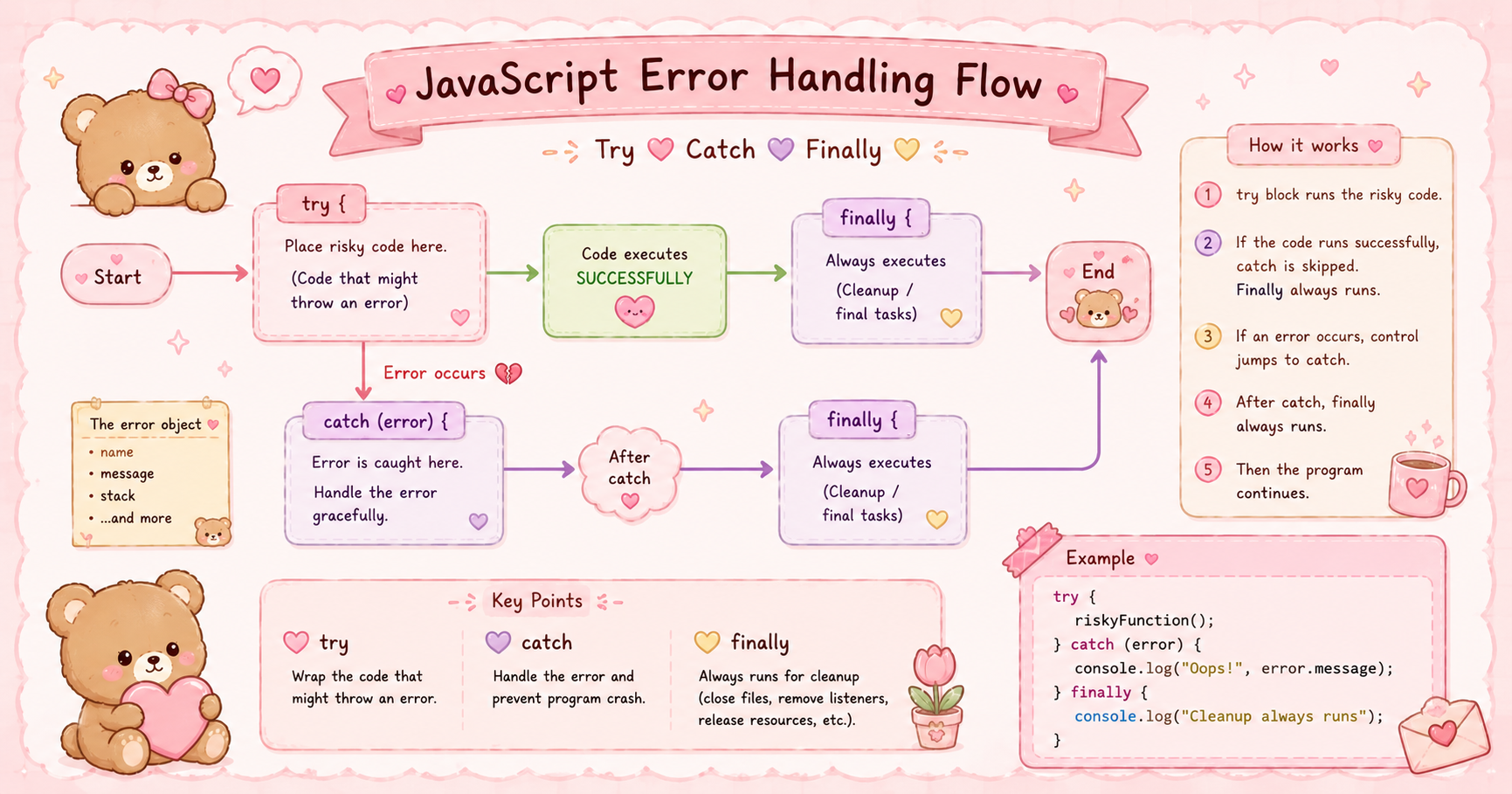
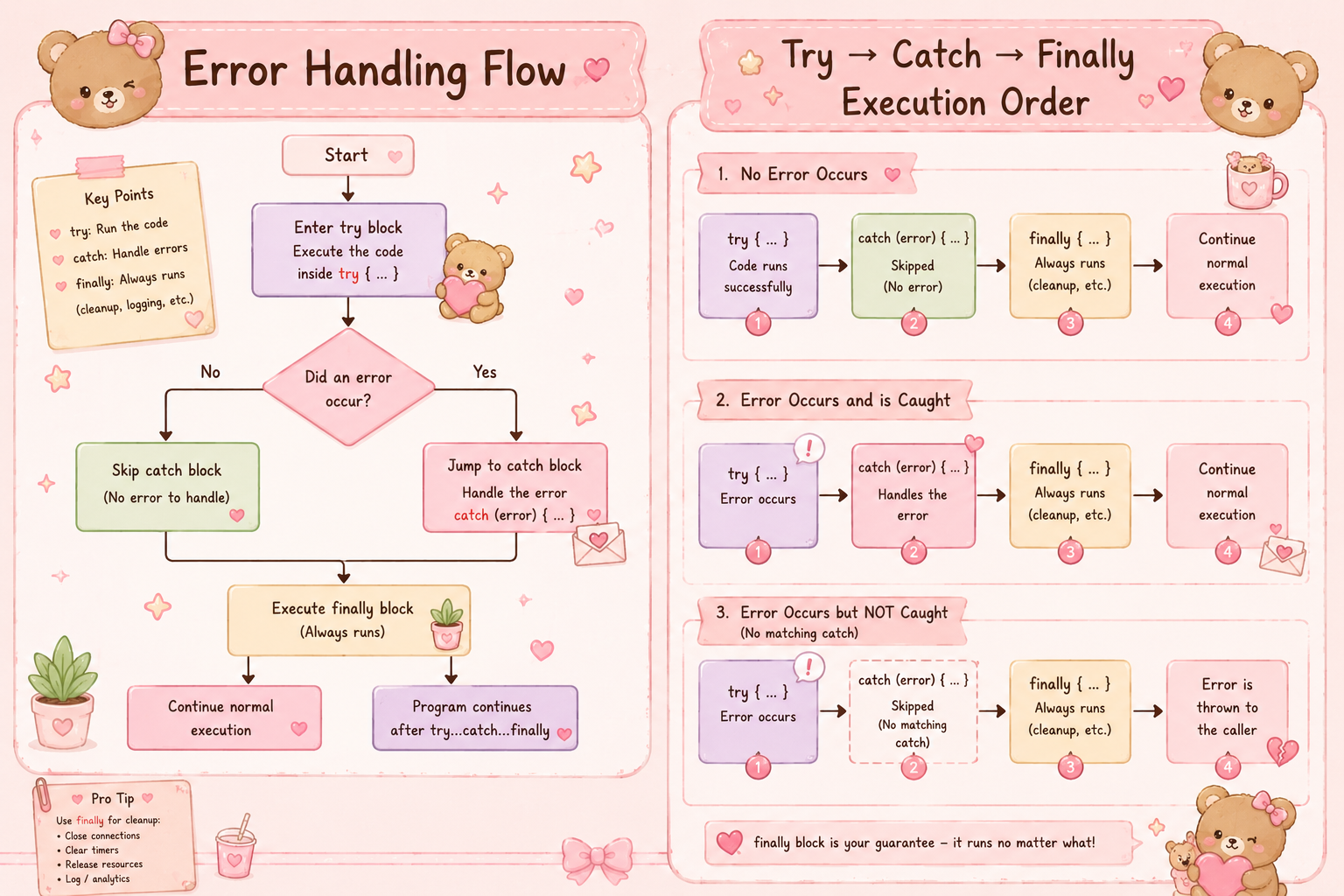
The try...catch block is your first line of defense. You wrap the risky code inside try, and if something goes wrong, catch steps in so the rest of your app keeps running.
try {
  const user = null;
  console.log(user.name);
} catch (error) {
  console.log("Something went wrong:", error.message);
}
Without try...catch, the error stops everything. With it, you get a controlled failure — the error is caught, you log a message, and the program moves on. That's called graceful failure, and it matters a lot in real-world apps.
The error object inside catch gives you useful info:
error.message— a readable description of what went wrongerror.name— the type of error (likeTypeErrororReferenceError)
Use them when logging or debugging. They save a lot of head-scratching.
3. The finally block
finally runs no matter what — whether the try block succeeded or the catch block fired.
try {
  const data = JSON.parse('{"name": "Aryan"}');
  console.log(data.name);
} catch (error) {
  console.log("Failed to parse:", error.message);
} finally {
  console.log("Done. Always runs.");
}
This is perfect for cleanup tasks — closing a database connection, hiding a loading spinner, resetting a form. You don't want that stuff to only happen sometimes. finally makes sure it always does.
4. Throwing custom errors
JavaScript lets you throw your own errors using the throw keyword. This is useful when you want to enforce rules in your code.
function divide(a, b) {
  if (b === 0) {
    throw new Error("You can't divide by zero.");
  }
  return a / b;
}

try {
  console.log(divide(10, 0));
} catch (error) {
  console.log("Caught:", error.message);
}
You're not waiting for JavaScript to fail — you're deciding when something should be treated as an error. This makes your code more predictable and much easier to debug when things go wrong.
You can also use built-in error types like TypeError or RangeError to be more specific:
throw new TypeError("Expected a number, got a string.");
5. Why error handling matters
Here's the honest answer: without error handling, your users see broken pages and your team wastes hours debugging.
Good error handling does three things:
Keeps the app running — one failed function doesn't crash everything else.
Makes debugging faster — a clear error message with context is 10x better than a silent failure.
Builds trust — users notice when an app fails quietly and recovers, versus when it just... dies.
It's also just good hygiene. When you add try...catch around API calls, user inputs, or any operation that could go sideways, you're writing code that's ready for the real world — not just the happy path.
Error handling isn't the most exciting part of JavaScript. But it's one of those things where a little effort upfront saves a lot of pain later. Start small — wrap your API calls, validate your inputs, add a finally for your loaders. You'll notice the difference.


