Synchronous vs Asynchronous JavaScript

JavaScript can confuse a lot of people, especially when terms like "synchronous" and "asynchronous" get thrown around. But honestly, once you get the core idea, everything starts to click. Let me break it down in the simplest way I can.
What synchronous code means
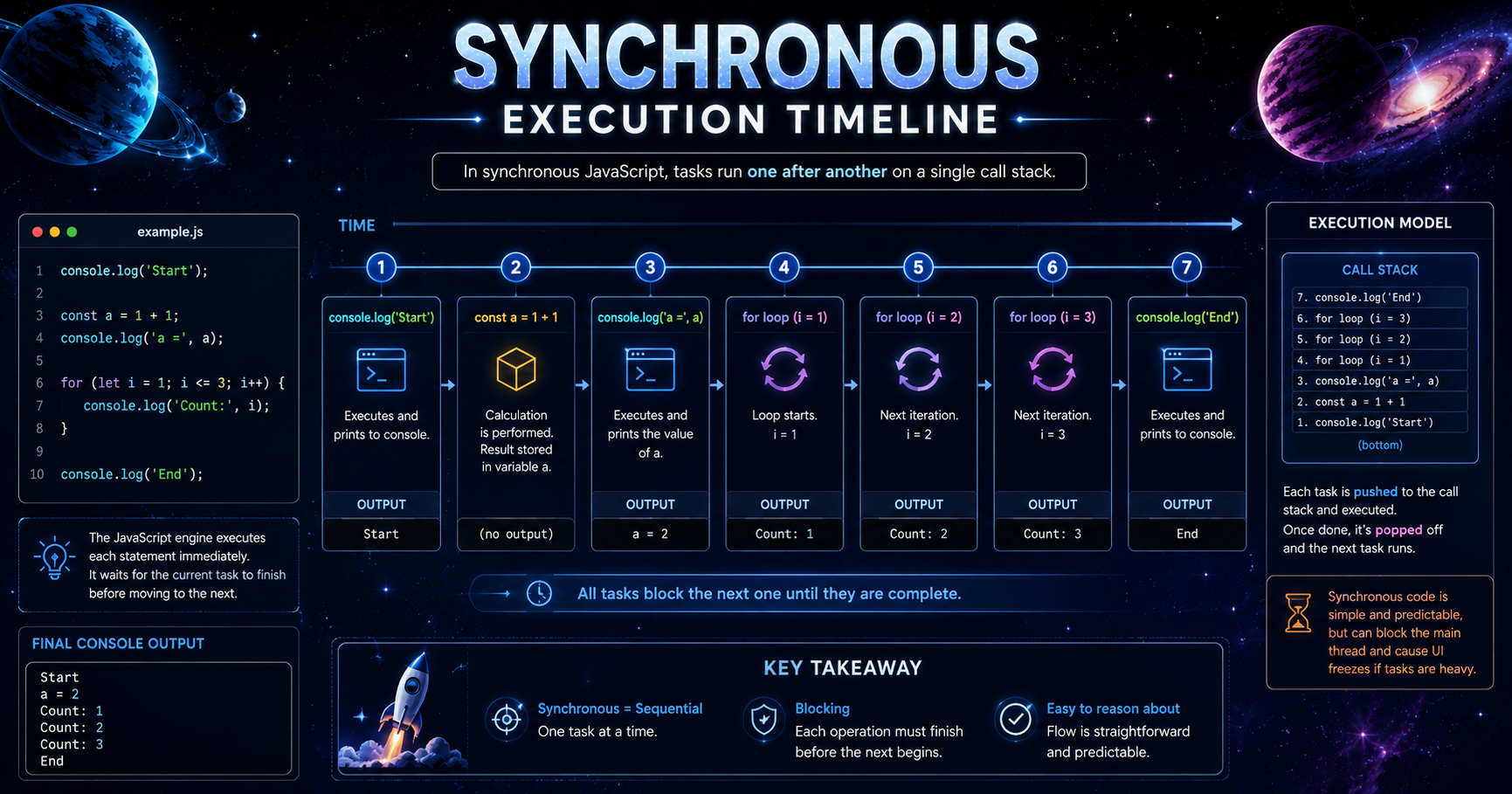
Think of synchronous code like standing in a queue at a coffee shop. You walk up, place your order, and just stand there waiting until the barista hands you your cup. Nobody else gets served until your order is done. One thing at a time, in order, no interruptions.
That's exactly how synchronous JavaScript works. Each line of code runs only after the previous one finishes.
console.log("Step 1");
console.log("Step 2");
console.log("Step 3");
Output? Always in order: Step 1, Step 2, Step 3. Clean and predictable.
What asynchronous code means
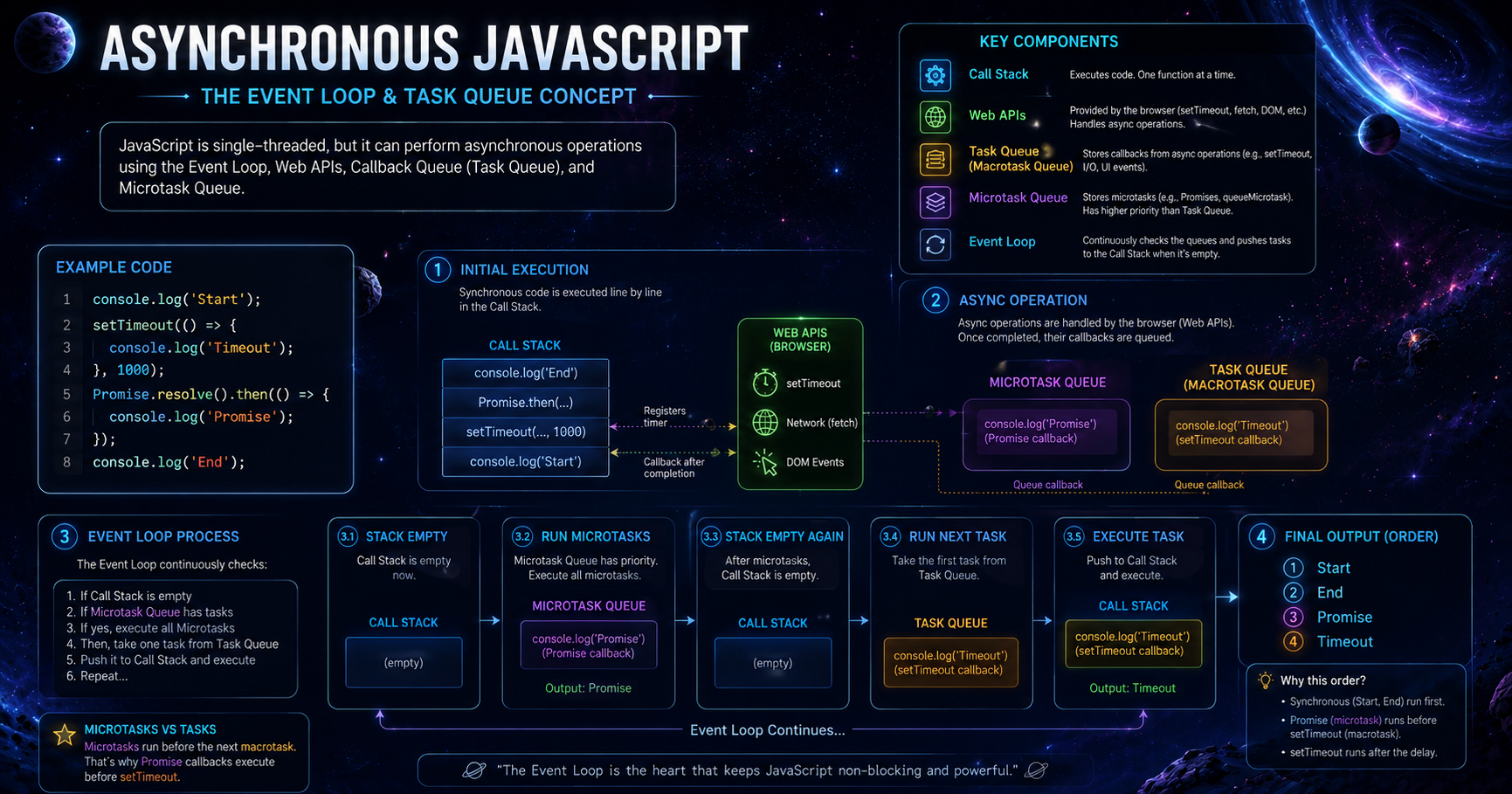
Now imagine the same coffee shop, but this time the barista takes your order, gives you a buzzer, and immediately starts serving the next person. When your coffee is ready, the buzzer goes off and you grab it. Nothing stops for you.
That's asynchronous code. JavaScript kicks off a task, moves on to the next thing, and comes back when that task is done.
console.log("Order placed");

setTimeout(() => {
  console.log("Coffee is ready!");
}, 2000);

console.log("Serving next customer");
Output: "Order placed" → "Serving next customer" → (2 seconds later) "Coffee is ready!"
Why JavaScript needs asynchronous behavior
Here's the thing — JavaScript runs in a single thread. It can only do one thing at a time. If you had to wait for every single task to finish before moving on, your app would feel completely frozen.
Imagine clicking a button and your screen locks up for 5 seconds while data loads. That's a terrible experience. Asynchronous behavior solves this. It lets JavaScript handle slow tasks in the background while keeping everything else running smoothly.
Examples like API calls or timers
The two most common cases you'll run into are timers and API calls.
Timers use setTimeout or setInterval. You've already seen setTimeout above. These let you delay code execution without blocking anything else.
API calls are probably the bigger deal. When you fetch data from a server, it takes time — could be half a second, could be five. You don't want your entire page frozen during that wait.
fetch("https://api.example.com/data")
  .then(response => response.json())
  .then(data => console.log(data))
  .catch(error => console.log("Error:", error));

console.log("This runs while data is being fetched");
The fetch starts, and JavaScript moves on immediately. When the data arrives, the .then() callback handles it.
Problems that occur with blocking code
Blocking code is when a slow task holds up everything else. It's the equivalent of that one person at the coffee shop who can't decide what they want and everyone behind them just... waits.
In JavaScript, if you run a heavy loop or a slow operation synchronously, your entire UI freezes. Buttons stop responding. Animations stutter. The page feels broken.
// This blocks everything for a few seconds
for (let i = 0; i < 1000000000; i++) {}
console.log("Done — but everything was frozen until now");
This is why blocking code is a real problem, especially in browsers. Users expect things to stay responsive.
Asynchronous JavaScript exists for one reason: to keep your app alive and responsive even when things take time. Once you understand the difference between "wait for it" and "I'll come back to it," you'll write better, faster, and more user-friendly code.


